There are a number of good prebuilt options:
- dell r730xd
- dell r630
- dell r730
- dell 430
I would love to be able to put a gpu in there, so i would like to get a 4U chassis so that i know it will be tall enough to put that GPU in there.
https://www.ebay.com/itm/387112368924
there are 4U models of the r730 for pretty cheap.
SAS Drives (2.5”):
- https://www.ebay.com/itm/375444813361 (15$ 1TB)
- https://www.ebay.com/itm/204798768486 (10$ 1TB)
Chassis:
- https://www.ebay.com/itm/375492991246
- https://www.sliger.com/products/rackmount/4u/cx4150i/ ( would need jbod enclosure )
- https://www.sliger.com/products/rackmount/storage/cx3701/ ( would not need jbod enclosure, but would need mini itx build. ) ( this too expensive i do not like it :((( )
If i go with chassis without drive space, JBOD enclosure:
- https://www.ebay.com/itm/324663241031
- https://www.ebay.com/itm/235542669824
- https://www.ebay.com/itm/266428894440
Rack:
- https://www.amazon.com/VIVO-Freestanding-Adjustable-Networking-CART-SR25U/dp/B0BFJKX5XB/
- https://www.amazon.com/NavePoint-Networking-Equipment-Stationary-Capacity/dp/B01A6JQCR4
- https://www.ebay.com/itm/154506885026
- https://www.ebay.com/itm/166098095620 - went with this one, but paid 104$, and then they upped the price right after.
When I get one of these, I will also likely want a rackmounted switch
- https://www.ebay.com/itm/276337898489 ( 8 port, 25$, power adapter)
- https://www.ebay.com/itm/276337898489 ( gigabit poe 24 port rackmounted 34.99 $) ( seller changed listing and now its a different switch altogether )
- https://www.ebay.com/itm/315579631367 ( 24 port, poe, l3 & l2 managed switch 21.45 $, I went with this one.)
I will also likely want a rackmounted UPS, but those look like they can be found easily online for cheap.
I will also like a rackmounted shelf most likely
- https://www.amazon.com/Rising-Cantilever-Server-Shelves-Aluminum/dp/B07NBVVY1X/ ( 8in depth )
- https://www.ebay.com/itm/305656116183
- https://www.ebay.com/itm/186465484873 ( got one of these for r730 )
- https://www.ebay.com/itm/135159911302 ( got one of these for gaming pc )
I wound up buying a Dell r710, because i saw, what I thought was an incredibly good deal. I now know that it was not that crazy of a deal. I will likely upgrade to a better server later down the line. This one is very old, and has a CPU that is approx. half as powerful as my main computer CPU, and cannot be upgraded to anything good.
This limits my GPU options down to 25w GPUs only, unless I do significant work to externally power the GPU
Many people use the gt730 or gtx 1050 / 1030 , which requires cutting a pcie slot.
I also do not know if a GPU is even going to be valuable to me with this server, as it is relatively underpowered as a whole. I think it might wind up just being storage.
I bought this ram https://www.ebay.com/itm/166340221322 64GB of it, for 23$ is a great deal, and I can later expand up to 144GB
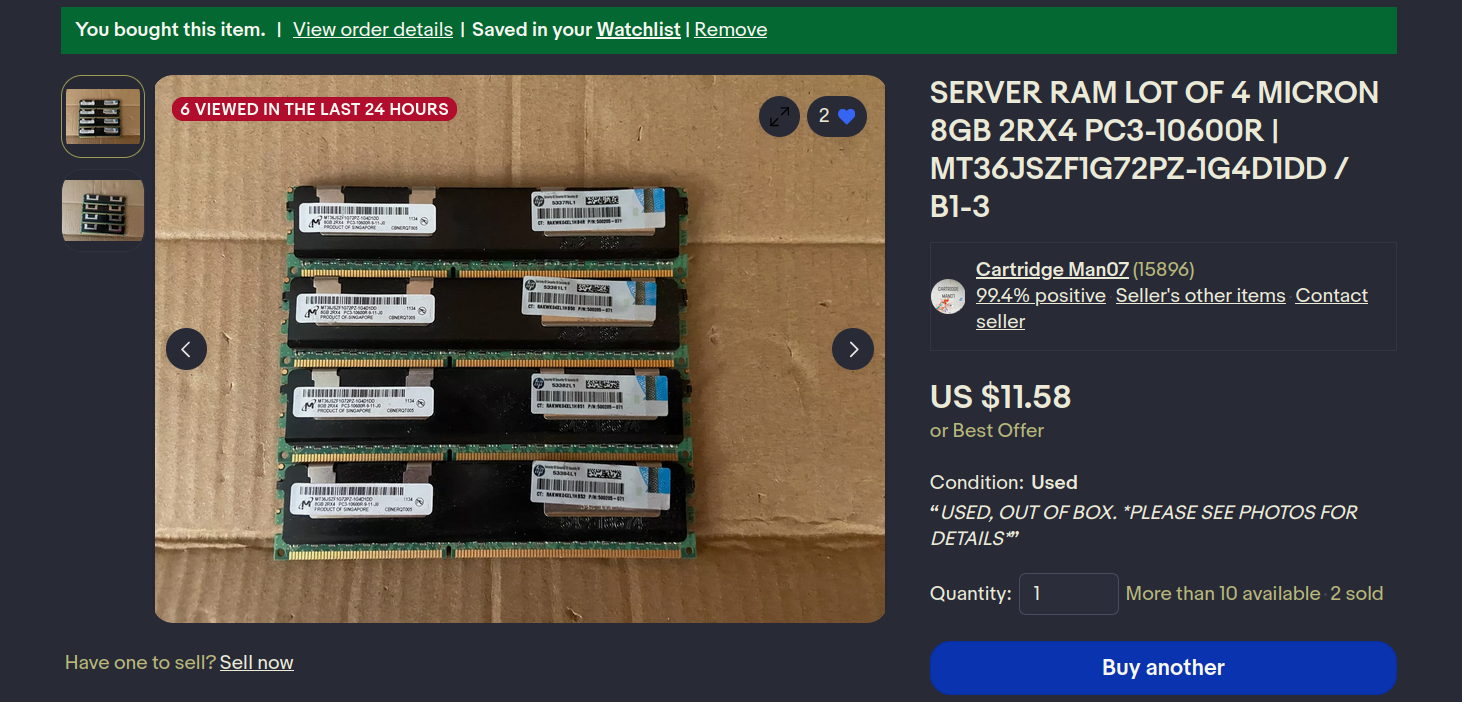
there are a number of valuable threads for the r710:
- https://www.reddit.com/r/homelab/comments/5ldiel/so_you_wantgot_an_r710/
- https://www.spxlabs.com/blog/2019/3/16/silence-your-dell-poweredge-server
- https://www.reddit.com/r/homelab/s/k0c2iDJsxt
- https://www.reddit.com/r/homelab/s/W3MhryhSPE
From these resources I learned about iDRAC, which is how you remotely interface with the r710. The r710 comes with iDRAC express, which can do a number of things, but iDRAC enterprise allows you to do IP-KVM, and a numbre of other things which are pretty coolio.
you can get an iDRAC enterprise card for real cheap - im not going to yet, because I do not know for sure that the server I bought does not already have one, but once I verify I need one I will buy one.
https://www.ebay.com/itm/176423235502
I still also need to get a rack. I also need rails. I also need a way to attach the two.
rackstuds seem well loved for mounting
https://www.amazon.com/dp/B07W67MXRV/
https://www.ebay.com/itm/326186586475 ( bought one of these )
rails seem comically expensive, and I think optional? not fully sure. regardless, I would like to get some.
Looking for “B1” rails cheapest I see is 50$, which i think is absurd, but maybe ill cope?
https://www.ebay.com/itm/305665269442
there are many for under 50$ but + shipping they all go up to 50+
https://www.ebay.com/itm/145837665596
^ says r710, 43.94$
for the rack, my options are limited. I would like it to be as big as possible. Here is, as of now, my perfect scenario:
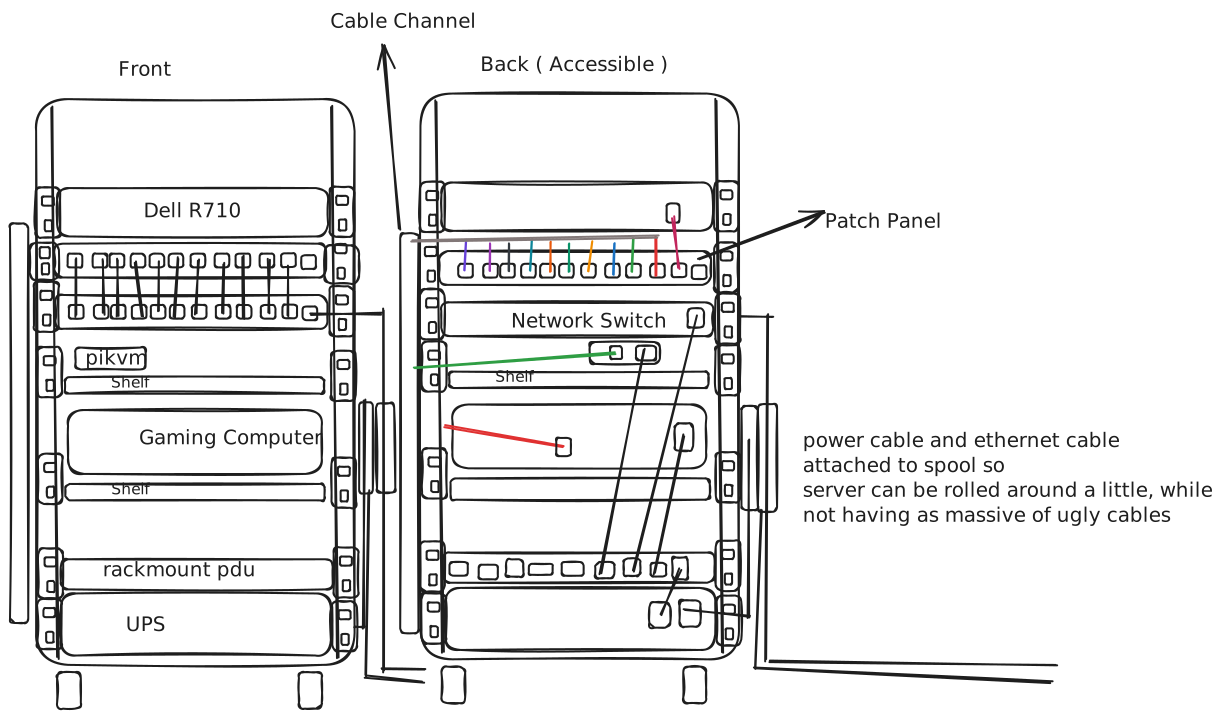 ( future tommy speaking, this diagram is still accurate just throw the r730 and r720 in there. the rack is bigger than my diagram lets on. they will fit just fine.)
ive just bought an r720 and r730.
i went with a vevor 20U rack for 100$ (shipped)
( future tommy speaking, this diagram is still accurate just throw the r730 and r720 in there. the rack is bigger than my diagram lets on. they will fit just fine.)
ive just bought an r720 and r730.
i went with a vevor 20U rack for 100$ (shipped)
I need the following:
- switch -
- pdu -
- ups
- rails for:
- dell r710
- Needs dell B1 rails -
- dell r720
- Needs dell B6 rails -
- dell r730
- Needs dell B6 rails -
- gaming computer
- Needs some kind of strong shelf
- could be r710 chassis
- could be navepoint adjustable rails -
- Needs some kind of strong shelf
- dell r710
- patch panel -
- keystones for patch panel -
- little cables to go from switch to patch panel -
- hard drives for servers /
- cable management channels -
for the patch panel: https://www.amazon.com/NavePoint-24-Port-Modular-Patch-Panel/dp/B0060RUTNU
for the little ethernet cables: https://www.amazon.com/dp/B079584P5Y/?th=1
for the keystones: https://www.amazon.com/NavePoint-Keystone-Coupler-Thermoplastic-15-Pack/dp/B0B5HNDBXJ/ ( 14.69 for 15 pack, but cat5e )
https://www.amazon.com/Sokqovt-Keystone-Coupler-Female-Ethernet/dp/B0D22R75VC ( cheapest, 9.99 for 24 pack, cat6, unshielded )
https://www.amazon.com/TRENDnet-Keystone-TC-KC06C6A-Shielded-Ethernet/dp/B0C5YYMVR1/ ( most expensive, and also nicest, 24$ for 6 pack, cat6a, shielded )
for the pdu: https://www.amazon.com/CyberPower-CPS1215RM-Basic-Outlets-Rackmount/dp/B00077INZU?th=1 - cheaper: https://www.ebay.com/itm/226234266183
more expensive but seemingly better: https://www.ebay.com/itm/204894350422
has switches: https://www.amazon.com/Outlets-Power-Protector-Switch-Control/dp/B084RYCNT7
vertical mounting can be done through something like https://tripplite.eaton.com/vertical-pdu-installation-bracket-for-server-racks~SRPDU4PHDBRKT?q=vertical%20pduu if i wish to go the vertical route
nicest option reasonable: https://www.amazon.com/CyberPower-PDU15M2F12R-Metered-100-125V-Rackmount/dp/B003KBB35C/
50$ decent : https://www.ebay.com/itm/225161999033
went with this one : https://www.ebay.com/itm/355893619803
for the rails: r720 and r730:
- https://www.ebay.com/itm/364932753601
- https://www.ebay.com/itm/115992195751 r710:
- https://www.ebay.com/itm/185931578907 gaming computer:
- https://www.ebay.com/itm/186465484873
- https://www.ebay.com/itm/355811367089
- https://www.ebay.com/itm/355811367113
cable management channel:
- https://www.amazon.com/Vertical-Cable-Organizer-Finger-Ducts/dp/B01LN1TVCM?th=1
- https://www.amazon.com/Professional-Management-Capacity-Electrically-Computer/dp/B09DYMRL2T
- https://www.amazon.com/Trunking-Raceway-Concealer-Organizer-Management/dp/B09SZK9HLB/
- https://www.amazon.com/Updated-31%EF%BC%882x15-5%EF%BC%89-Management-Computer-L15-5inch/dp/B08LYKF8S1
- went with this one : https://www.ebay.com/itm/126597272438 ( 8 15in channels @ 23$ total) it is not specifically for this, but it has holes in the back so why wouldnt it work? Also, I am thinking, worst case scenario the holes arent spaced right and I drill more holes. That works for me.
switch
- https://www.ebay.com/itm/296496378936
- https://www.ebay.com/itm/166428109075
- https://www.ebay.com/itm/166361095148 ( 2 switches, unmanaged, 1000mbps, 40$.)
drives: primarily sourcing from auctions. Shooting for 1.2 tb or 1 tb. If I can slowly upgrade all the drives to 1.2tb my zfs pool would shoot up in size as it would not be limited by the remaining 1tb drives. do not want to go below 1tb ( so no 900gb ) . I would also like to fill up each slot in the R730, so that means I would need a total of 7 more drives. this is not urgent and can be done over time just grabbing best deals I see on drives.
https://www.ebay.com/itm/186375158133 - EMC ( EMC Hard Drives ) so be aware of that. I bought 3 of them @ 11 each. Still not a bad deal, but god it is so much work to reformat them it might not be worth it.
https://www.ebay.com/itm/204504540958 - 1.2Tb @ 16$ each, i bought one.
https://www.ebay.com/itm/305680016699 - 1Tb @ 15.48$ each, I bought one.
https://www.ebay.com/itm/387206944870 - 1Tb @ 15.09$ each, I bought one.
https://www.ebay.com/itm/315553660448 - 1Tb @ 12$ each, I bought one.
Servers: Dell R710 - https://www.ebay.com/itm/176380889507 - 99. They all require further research which I have not yet done. Many people claim I cannot make it into a rack mount case for my existing PC. I have access to a drill and hot glue and motherboard standoffs and therefore I disagree with them. I do not understand how I could fail to make it work as a JBOD. Seems like I would just need to buy longer SAS cables and run them up to the R730.
Dell R720 - https://www.ebay.com/itm/296560279560 - 129.71. Also, H710P, which was crucial for formatting those EMC drives. I do not regret this purchase.
Dell R730 - https://www.ebay.com/itm/145882873817 - 168.44. They are all pretty bad. This is a full server, it is completely quiet, and it is so so so baller. Could not be happier. Only came with 32GB ram, so I got another 16 for 23$ ( https://www.ebay.com/itm/395546981323 ) and will likely get another 16 at some point to bring up to 64. I know that may sound like more than is necessary but I run a lot of VMs. It is likely that long term 64GB will not be enough. This is the only server running, and with its current workload ( i have not finished migrating things to it yet, I have barely even started because I have not had enough time ) it draws 112W. This is the only item I have turned on which I can see power draw on. The only other item I have on the rack is the switch, which cannot show powerdraw. If I got a UPS, i would be able to see powerdraw of all items attached to the UPS. ( UPS related plans low power )
technologies ive learned more about thusfar from this process:
- iDRAC
- updating idrac version
- idrac enterprise vs express
- using icedtea’s jnlp viewer to get a remote console to idrac ( non trivial even though it is an idrac enterprise core feature )
- using a docker image to get a remote console to idrac
- adjusting server fan curves over ipmi and finding utilities to automate doing so to fit temperatures
- racadm ( dell’s cli for administration of their servers )
- tftp ( through dnsmasq or uftpd )
- updating firmware images on most networking related devices
- using a console cable to get an interactive shell
- openwrt flashing and configuration via cli
- RAM
- LRDIMM vs RDIMM
- ECC
- Ranks ( still dont fully understand ranks )
- Compatibility in servers with mixing RAM ( Poor! )
- server racks ( rack units, sizes, required hardware to mount stuff, cable management )
- switches
- L2 vs L3 managed vs unmanaged
- Smart vs managed
- basics of cisco’s iOS cli for their switch ( yes cisco named their operating system the same thing apple did. what a stupid thing to do.)
- Vlans
- power consumption of different devices & minimizing power consumption
- Replacing fans in consumer devices and adjusting pinout to work properly && putting resistors into fan cabling to adjust fan noise if fan configuration is decided to be too aggressive and isnt easily externally controllable
- proxmox
- memory ballooning for VMs
- creating templates for cloning later
- CEPH
- removing subscription nags from proxmox
- switching repositories from the enterprise repo which requires the subscription to the pve-no-subscription repo so you can actually update your system
- What “sockets” mean when creating a VM… hint: not what i thought it meant!!!!!!!!!! ( I had just seen that and assumed “sockets” was a property of a CPU like threads or cores. Like when you see in a operating system, that a program opened a socket. I then casually said that in conversation with a coworker. I was not correct. It is for doing optimization through NUMA if you have dual cpus on a server, which I do, and so I was given that option. )
- resizing vm disks ( not simple )
- best practices for what to run on your hypervisor and what not to run on your hypervisor
- planning for individual VM per service vs one dedicated vm for all docker services
- ZFS
- RAIDZ1 vs Z2 vs Z3 vs draid vs raid ( various levels ) vs mirror
- creating zpools on the CLI and in the proxmox UI
- importing a CLI created zpool into the proxmox UI
- basics of how a ZFS filesystem works ( zdevs, zpools, etc )
- dynamics of adding drives to a zfs pool ( not simple )
- dynamics of different sized drives in a zfs pool ( pretty simple, just uses the lowest sized one so that it can still have parity across all of them )
- other filesystems ( normal raid, mergerfs, btrfs, ceph )
- raid controllers
- flashing IT mode to a raid controller to turn it into an HBA ( my h710P )
- using HBA mode on an H730 and the downsides of that
- downsides of using integrated raid controllers
- no support for mixing ssds and hdds usually
- no ability to use ZFS
- clunky to configure
- cannot just move drives to a different device and retain data ever. raid configuration entirely proprietary. you need the same raid controller in order for it to work.
- upsides of using integrated raid controllers
- when drive fail light go orange !!!!!!!
- simple setup - put drives in, boot, hit C, create array, done.
- EMC storage ( EMC Hard Drives )
- SSH Keys
- using ssh-keygen to generate keys
- Password protected keys with ssh-keygen
- using ssh-copy-id to deploy keys
- Server naming schemes and common server brands
- NAS DAS and JBOD appliances
- SAS and SATA as standards
- SAS ports being backwards compatible with SATA
- devices without SAS controllers being unable as a whole to interpret SAS. You have to buy a pcie hba or similar to interpret SAS. You cannot buy a SAS to usb adapter. Er, you can, but what it does is emulate an HBA on a little cpu in there and it costs 250$. It is also sold out, because people want it that bad. Crazy stuff.
- Systemd services and timers
- creating md5 hashes and using them as a foolproof check for changes in filesystems when inode stuff isnt good enough ( damn you syncthing!!! )
- bash scripting
- docker and permissions relating to it ( finally got it together and stopped just using sudo every time i needed access to docker! )
- Kubernetes ( I have, what can almost be considered, a basic understanding of kubernetes. )
- Server chassis with desktop hardware ( what works, what doesn’t and pricing )